
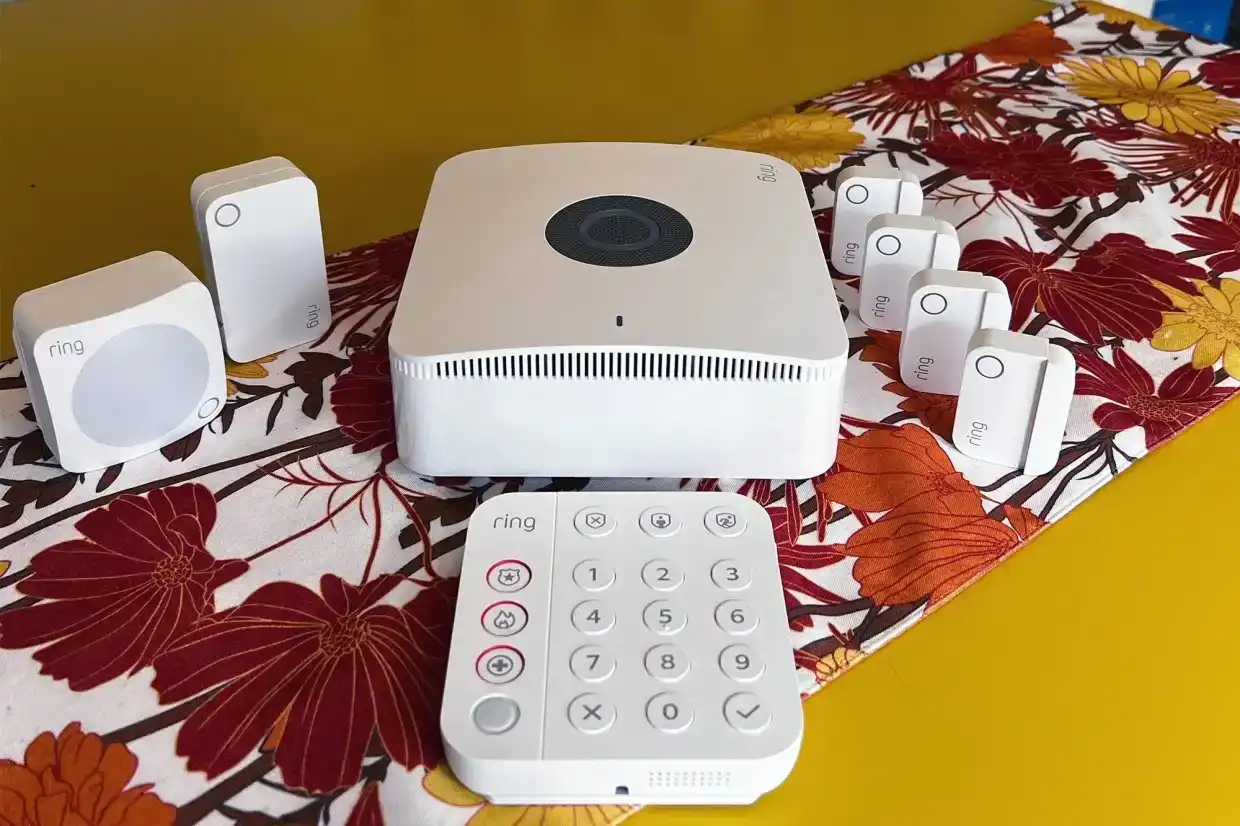
Ring Alarm Pro Security System Dropping to Half Price During Sale
A steep discount on a home security kit does more than save money. It changes the kind of buyer who can take the system seriously. Ring Alarm Pro is getting attention because it combines door and window protection, motion alerts, app control, and a built-in router in one box. For U.S. homeowners, renters, and small home-office workers watching every monthly bill, that matters. A normal alarm kit protects the house. This one also touches the Wi-Fi network, outage plan, and camera setup. That is why a sharp price cut feels different from a random gadget deal. Readers following home security sale coverage are not only asking whether the discount looks good. They want to know whether the kit fits their home, internet setup, subscription comfort level, and daily routine. The short answer: it can be a smart buy, but only if you understand what makes it different before you chase the sale tag.
What Makes This Sale Worth a Closer Look
A home security sale can tempt people into buying too fast. That is where many bad purchases start. A lower price feels like the answer, yet home protection is not a blender or Bluetooth speaker. It becomes part of your doors, hallway, garage entry, Wi-Fi habits, and emergency routine.
The Pro kit stands out because it blends physical sensors with network features. Ring says its security kits include a Base Station, Contact Sensor, Motion Detector, Keypad, and Range Extender, while the Pro version adds a built-in eero Wi-Fi 6 router and outage-related internet features.
Why the discount changes the buyer’s math
At full price, many shoppers compare this system against cheaper DIY kits and decide the added router feature feels like too much. That reaction makes sense. Not every apartment or small ranch home needs an alarm hub that also handles network duties.
The sale changes the question. You are no longer asking, “Do I want to pay extra for a hybrid system?” You are asking, “Can one purchase replace two upgrades I might need anyway?” A family in Phoenix with an aging router and a sliding glass back door may see more value than someone in a studio apartment with fresh Wi-Fi gear.
That is the quiet twist. The best buyer is not always the person most worried about break-ins. It may be the person whose internet setup already feels tired. When the equipment price drops, the router side stops looking like a bonus and starts looking like part of the deal.
The kit is not only about alarms
A standard alarm setup answers one fear: someone opens a door, breaks a window, or walks through a room when they should not. That is useful, but modern homes have a second weak spot. A power or internet outage can make cameras, alerts, and remote access feel fragile.
The Pro model answers that fear by tying the security system to the network. The eero page lists the base station as supporting speeds up to 900 Mbps and coverage up to 1,500 square feet, which gives shoppers a clear sense of where it fits best.
That does not mean it beats every stand-alone router. A larger two-story house in Ohio with thick walls may still need extra extenders. A gamer or remote worker with a premium mesh network may prefer to keep that setup. Still, for a mid-size home with basic internet needs, the built-in approach can reduce clutter and make setup less messy.
Why Ring Alarm Pro Feels Different When the Price Drops
Ring Alarm Pro sits in a strange middle lane. It is not the cheapest alarm kit. It is not a full-service old-school system with a technician drilling holes and selling a contract at the kitchen table. It is a DIY kit with enough serious features to make budget buyers pause.
That middle lane becomes more attractive during a sale. People who ignored it at full price may now compare it against a basic alarm kit plus a separate router upgrade. Once those two costs sit side by side, the sale can feel less like a discount and more like timing.
The built-in router is the hidden value
The eero Wi-Fi 6 router is the part many shoppers underplay. They look at the box and count sensors, because sensors are easy to understand. Door sensor. Motion sensor. Keypad. Done.
But the router matters because so many home security complaints are not about sensors. They are about weak Wi-Fi, cameras dropping offline, app delays, and alerts arriving late. A security device is only as useful as the connection behind it.
Here is the catch. The built-in router is not a magic fix for every house. It works best when you are willing to let the system become part of your main network. If you already own a high-end mesh setup, you need to think twice before replacing or reshaping it. The sale price should not push you into making your Wi-Fi worse.
Backup internet helps during the moments people remember
Most people do not think about backup internet on a normal Tuesday. They think about it when a storm knocks out service, when a kid is home alone, or when a camera goes dark during a delivery dispute.
Ring’s support page says the feature can keep the alarm system, eero Wi-Fi network, Ring cameras, and other Wi-Fi devices connected through cellular data when the main internet connection fails. It also says a compatible subscription is needed and includes 3GB of cellular data each month, with extra data available at $3 per GB.
That limit matters. Three gigabytes is useful for alerts, basic connectivity, and short outages. It is not a free replacement for home broadband. A family streaming movies through an outage would burn through that data fast. The smarter use is lighter: keep alerts moving, keep the system reachable, and preserve enough connection to avoid feeling blind.
Who Should Buy It During the Sale
The best buyer is not “everyone who wants security.” That is too broad. The best buyer has a home where the alarm, Wi-Fi, and camera setup all overlap. When those needs meet, the sale makes sense.
That is why the system fits some American households better than others. A renter in Dallas may care about easy setup and no long contract. A homeowner in New Jersey may care about basement entry sensors, driveway cameras, and outage coverage during winter storms. Both can be good candidates, but for different reasons.
It fits homes that need simple coverage fast
A 14-piece style kit can cover common weak points in a typical single-family home: front door, back door, garage entry, several first-floor windows, and a hallway. Amazon’s product listing describes a 14-piece setup with one Pro base station, two keypads, eight contact sensors, two motion detectors, and one range extender.
That kind of box works well for someone who wants a practical weekend setup. You do not need to map every inch of the house. You start with the doors people use, then add sensors where risk and routine meet.
A good example is a split-level home where the garage door is used more than the front door. Many families protect the front entrance first because it feels obvious. The garage entry may matter more. That is where kids come in, packages sit, and tools are stored.
It may not fit every smart home
The sale is less persuasive if your home already has a strong alarm setup or a premium router system. Buying the Pro kit only because the tag looks good can create extra work. A cheap price is not a plan.
Ring’s own FAQ says it does not recommend using the Pro hub as a Wi-Fi extender for an existing router because that can block access to several compatible subscription features, including 24/7 Backup Internet.
That detail should slow down advanced users. If you already built a polished network with another router brand, the alarm-router combo may ask you to rethink the whole setup. For some, that is fine. For others, it is a headache wearing a sale sticker.
The non-obvious advice is simple: buy it when it can become the center of the setup. Skip it when it would sit awkwardly beside gear you already trust.
What to Check Before You Add It to Cart
A strong sale can still turn into a weak purchase if you ignore the monthly side. The equipment price is only the first layer. The subscription, monitoring needs, data limits, and power plan decide whether the system feels useful six months later.
Start with your real home, not the product page. Count the doors, windows, halls, and rooms you want covered. Think about where your router sits. Notice whether your modem is in a poor location, like a metal utility box or a far corner of the basement. Those details matter more than the biggest discount badge.
Subscription costs decide long-term value
Professional monitoring and advanced features can change the value of the system. Ring’s current plan page lists the Pro plan at $19.99 per month or $199.99 per year and includes features such as 24/7 Professional Monitoring.
That price may still be lower than some traditional security plans, but it is not nothing. A buyer who wants the equipment only for local alerts will judge the deal one way. A buyer who wants emergency monitoring, backup data, and deeper camera features will judge it another way.
This is where many shoppers fool themselves during a home security sale. They compare the sale price against the old equipment price and stop there. The better move is to calculate the first year. Add the kit, subscription, any extra sensors, a microSD card if you want local video storage, and possible power accessories.
Power outages need a plain plan
Power is the part people forget until the lights go out. Ring support says the base station can run on its internal battery for up to 24 hours in Low Power Mode, but most functions and Wi-Fi turn off to save energy. It also says Power Packs can support more features during an outage, with each pack adding up to eight hours.
That means the internal battery is good for alarm basics, not full normal use. If you live in a place with frequent outages, such as parts of Florida during storm season or rural areas with overhead lines, you should price the power plan before you buy.
The counterintuitive part is that a security system can be more honest when it has limits. Knowing the battery mode is limited helps you plan. You can decide whether you need Power Packs, whether your modem and network gear need a UPS, and whether backup internet is for alerts rather than entertainment.
Conclusion
A sale can make a smart product look smarter, but it can also hide the wrong fit. The best reason to buy this kit is not fear. It is alignment. Your doors need sensors, your router could use an upgrade, your cameras depend on steady connection, and you like the idea of one system managing more of the home. For that buyer, Ring Alarm Pro can make sense when the equipment price falls hard enough to narrow the gap between a basic alarm kit and a more connected setup. Still, the right move is to check your layout, subscription comfort, internet needs, and outage risk before you buy. The discount may be the push, but the fit should be the reason. For more buying context, compare it with DIY home alarm setup ideas and smart home safety upgrades before you make the final call.
Frequently Asked Questions
How much should I expect to save during a Ring security kit sale?
Savings vary by retailer, bundle size, and timing. The best deals often appear around Prime Day, Black Friday, Memorial Day, and holiday sales. Check the final cart price, not only the advertised discount, because bundles and subscription trials can change the value.
Is the Pro alarm kit worth it for renters?
It can be worth it for renters who want DIY installation, app control, and portable equipment. The better fit is a rental with several entry points and permission to place sensors. Renters should avoid permanent mounting unless their lease allows it.
Does the built-in router replace my current Wi-Fi router?
It can replace a basic router for many homes, but it should not be treated as an automatic upgrade for every network. If you already own a strong mesh system, compare placement, speed needs, and feature tradeoffs before changing your setup.
What happens if my internet goes out?
With the right subscription, the system can use cellular data to keep key connected features online. The included monthly data is limited, so it is best for alerts, security access, and short outages rather than heavy browsing or streaming.
Do I need professional monitoring with this system?
No, but professional monitoring adds emergency response support when enrolled through an eligible plan. Without it, you still receive alerts and can manage the system yourself. The right choice depends on your budget, schedule, and comfort handling alerts alone.
Is this a good choice for a small apartment?
It may be more than a small apartment needs. A basic kit can cover one door, a few windows, and a hallway for less money. The Pro version makes more sense when you also want router features or outage support.
What extra accessories might I need after buying the kit?
Common add-ons include extra contact sensors, motion detectors, glass break sensors, smoke and CO listeners, flood sensors, eero extenders, and power accessories. Buy the core kit first, map your weak spots, then add only what your home truly needs.
When is the best time to buy a Ring alarm system?
Major retail events usually bring the best prices. Watch Prime Day, Black Friday, Cyber Monday, and late-summer home improvement sales. Before buying, compare the same bundle across Ring, Amazon, Best Buy, and Home Depot because kit contents may differ.